Your tax software knows how to file a return. Your bookkeeping app knows how to reconcile an account. Neither one reminds you that a new prospect asked for a proposal three weeks ago, or that a client's extension deadline is ten days out and you're still missing their K-1s. A free CRM for accountants and bookkeepers fills that gap: it's the layer that tracks client relationships, deadlines, and referral-driven leads — the stuff that lives in your head, your inbox, and a spreadsheet nobody fully trusts.
This guide covers a setup built for how accounting practices actually run: deadline-heavy delivery work on one side, a slow-but-steady referral pipeline on the other. You can stand it up in an afternoon.
Why accounting practices need a CRM, not just filing software
Practice management and tax prep tools are built around returns and engagements. They're not built around the two things that quietly determine whether your firm grows and stays sane:
- Deadlines that recur and cascade. Quarterly estimates, payroll filings, sales tax, extensions, year-end. Each client has their own stack of dates, and the penalty for missing one is real.
- Leads that trickle in from relationships. Most accounting work comes from referrals — a banker, an attorney, a happy client who told a friend. Those warm introductions are easy to let go cold because they don't feel like "sales."
A spreadsheet can hold the data, but it can't nudge you. It won't email you that a task is due, and it can't be filtered by "whose client is this" when you've got a small team. That's where a CRM earns its place. If you're weighing the two, the honest breakdown is in CRM vs. spreadsheet.
Track every client deadline as a task, not a memory
The core move for an accounting firm is to turn every recurring obligation into a dated task tied to the client's record. Not "I'll remember in April" — an actual due date with a reminder.
A workable structure:
- One contact (or company) per client, with tags for entity type —
s-corp,sole-prop,individual,payroll,sales-tax— so you can pull a filtered list in seconds. - A task per obligation, dated to its real deadline, with a lead time. If the return is due April 15, set the task for late March so documents-chasing starts early.
- Reminders on everything. When a tool sends an in-app and email nudge for what's due today and what's overdue, deadline tracking stops depending on you checking a calendar.
With tasks and reminders, each task has a due date and an automatic reminder, and the Today / Overdue / Upcoming views give you a single morning glance at what the firm owes clients this week. During busy season that one screen is worth more than any dashboard.
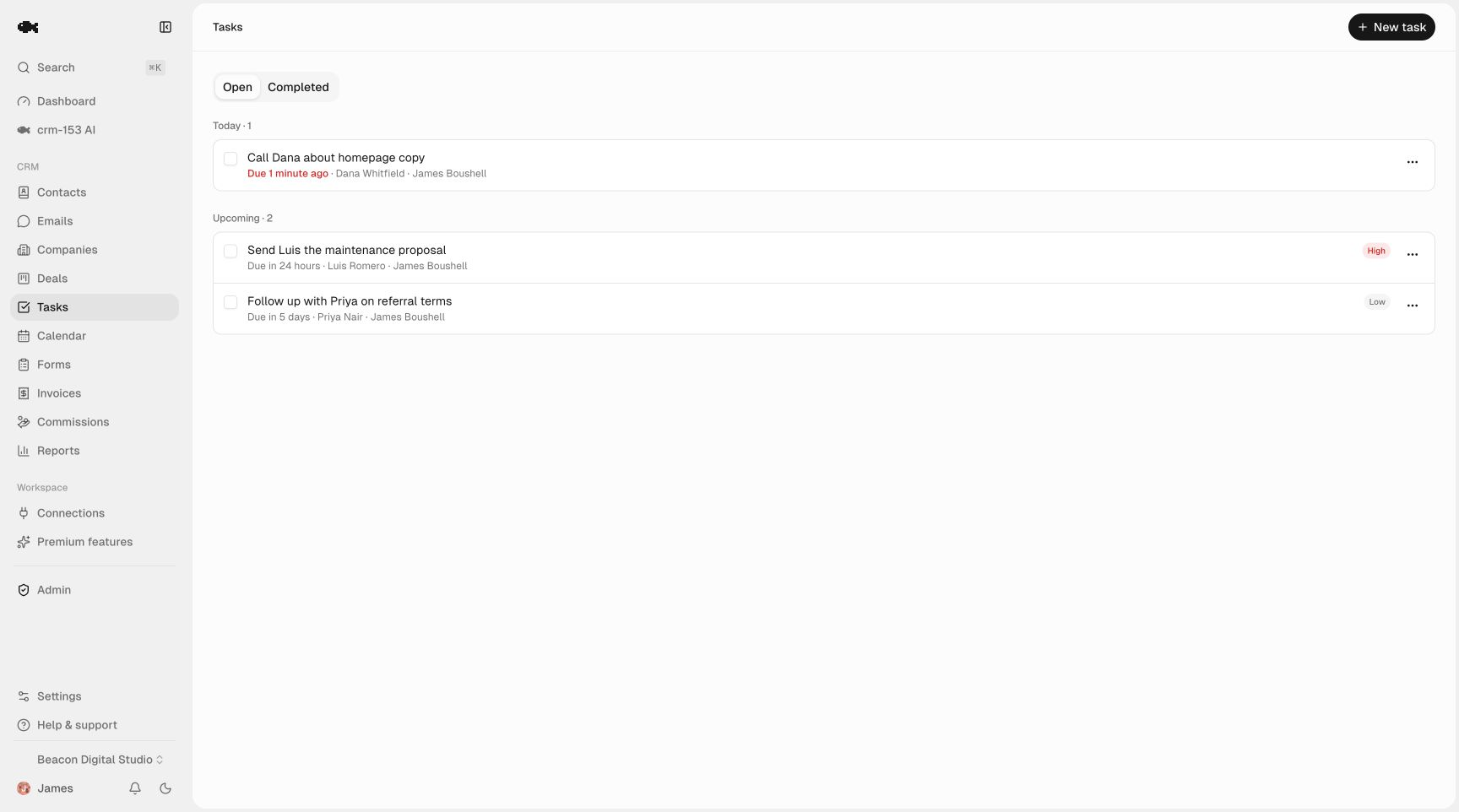
A simple deadline cadence for a typical client:
| Obligation | Task due | Reminder lead time |
|---|---|---|
| Q1–Q4 estimates | 15th of the filing month | 10 days before |
| Payroll filings | Per schedule | 5 days before |
| Extension deadline | Sept/Oct | 3 weeks before |
| Year-end / 1099s | Late January | 2 weeks before |
Run a referral pipeline that doesn't rely on goodwill
Referrals are your lead source, but "someone will probably call" is not a system. Treat every warm introduction as a deal moving through stages, so you can see who's waiting on you and who's gone quiet.
A lightweight stage set for an accounting practice:
- Referred / inquiry — intro received, no conversation yet
- Discovery call — scheduled or done
- Proposal / engagement letter — sent
- Won — signed, moves to onboarding
- Lost — with a reason (price, went in-house, chose another firm)
A sales pipeline gives you a drag-and-drop board with custom stages and per-column value totals, so you can see the dollar value of proposals outstanding at a glance. Because pipelines are unlimited, keep your referral pipeline separate from, say, an advisory-services upsell pipeline for existing clients.
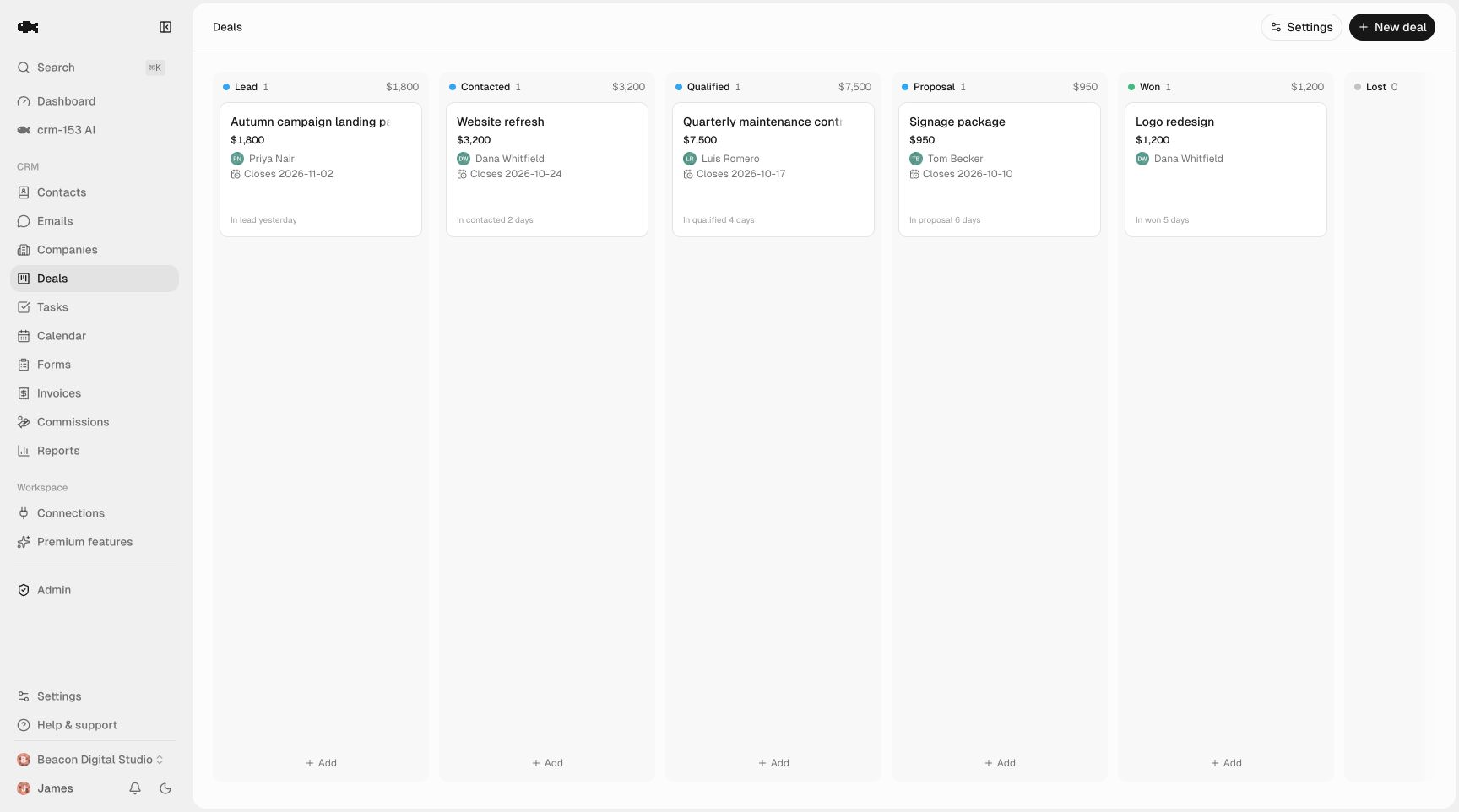
The detail that pays off later: tag every deal with its referral source. When you can filter won deals by who sent them, you know exactly which banker or attorney deserves a thank-you lunch — and which relationships quietly drive your firm. For the follow-up discipline that keeps those intros from going cold, see our lead follow-up system.
Keep client history where the whole team can see it
Accounting is a trust business, and trust lives in context. When a client calls asking why last year's return looked different, you want the note from that August conversation — not a scramble through email.
Log calls, emails, meetings, and notes to a shared activity timeline on each client record. One click, and the whole firm sees the same history. When a staff accountant covers for you during crunch time, they open the contact and see every prior conversation, open task, and deal in one place — no handoff meeting required.
With contact management, every client and referral partner is searchable and taggable, with an owner assigned. On a small team that owner field matters: filter to "my clients" versus the whole firm's book without separating the data.
Why "free" is the right call for a small practice
Most CRMs marketed as free cap contacts, limit seats, or lock exports behind a paid tier — and for a firm that lives on client data, a tool you can't fully export from is a liability. Before you commit to anything, it's worth reading is there a truly free CRM? so you know what to check.
crm-153 is genuinely free: unlimited contacts, unlimited pipelines, and unlimited team seats, so you can add every staff accountant and admin without per-user math. Full CSV import and export is always available — import your existing client list with a column mapper and email dedup, and pull all your data out any time. The entire business model is a small optional fee on online invoice payments; the CRM itself is $0, which you can confirm on the pricing page.
For an accounting firm, "free" isn't the hook — it's the proof there's no catch. You can import your client list this afternoon and see whether it fits your season, at no cost and no trial clock.
A 30-minute starting setup
- Export your client list from your accounting software and import it as a CSV.
- Tag clients by entity type and service.
- Create one task per recurring deadline for your top 20 clients, with reminder lead times.
- Build a referral pipeline with the five stages above; add any open proposals as deals and tag their source.
- Log one note on each active client so the timeline starts carrying history.
That's enough to run on. Want to see it before touching your own data? Open the live demo — it's a read-only real workspace — or start free with no credit card.