Most CRM advice assumes the hard part is winning the deal. But if your business lives on repeat orders — supplies, services, seasonal work, consumables — the first sale is only the start. Learning how to use a CRM to manage repeat customers means shifting the tool from a lead-chasing machine into a memory system for relationships you already have: who bought what, when they'll likely need it again, and how much each customer is actually worth over time.
This guide is about the post-sale side. If you're still building out your front-end lead process, the lead follow-up system guide covers that; here we assume the customer already said yes once, and your job is to make sure they say yes again.
Why repeat customers need a different setup
A lead pipeline is built around a finish line: the deal closes, it moves to "Won," and attention moves on. Repeat customers break that model. The relationship doesn't end at "Won" — it loops. The same person might buy quarterly for five years, and the real risk isn't losing a deal, it's quietly losing a customer who drifts to a competitor because nobody followed up.
Three jobs matter here, and a spreadsheet handles none of them well:
- Knowing when someone is due to reorder so you reach out before they run out, not after.
- Keeping the full history of what each customer bought, asked about, and complained about — so every conversation picks up where the last one left off.
- Seeing lifetime value, not just the last invoice, so you know which relationships deserve the most care.
Build a repeat-customer record that remembers everything
Start with the customer record itself. In a plain contact list you get a name and a phone number. For repeat business you want a record that answers "what's our history?" at a glance.
In a CRM, that's what the contact management and activity timeline features are for. Every call, email, meeting, and note gets logged in one place, in order, visible to anyone on your team. When a regular calls in, whoever picks up can see the last order, the open question from two months ago, and the note that they always want the invoice sent to accounts payable, not to the owner.
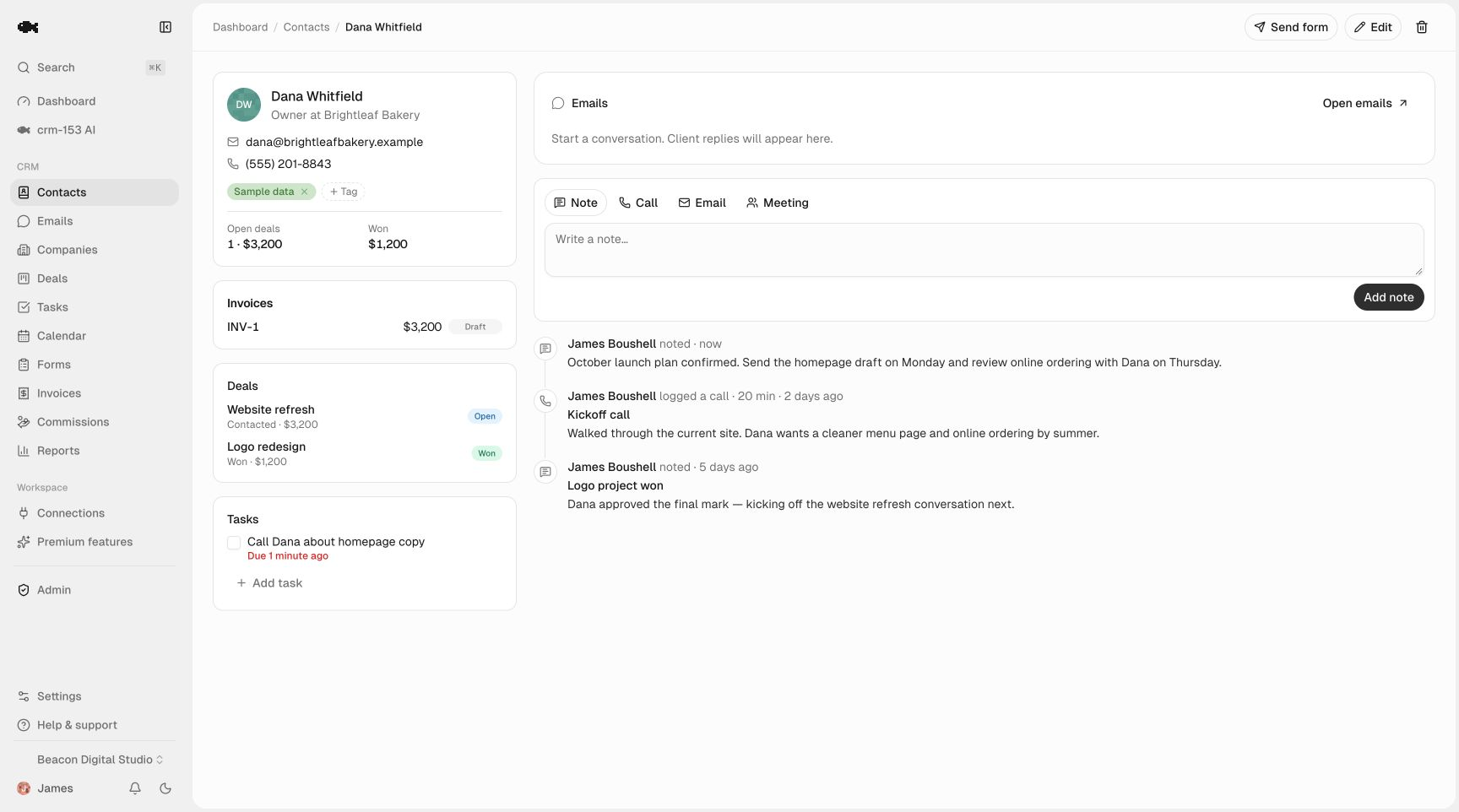
A few fields worth adding with tags or notes on each repeat customer:
- What they buy — product line, service tier, or SKU they reorder.
- Typical cadence — monthly, quarterly, every spring.
- Last order date — the anchor for your next reminder.
- Preferences and quirks — delivery window, contact person, payment terms.
Tags make this searchable. A tag like reorder-quarterly or wholesale lets you pull a whole segment in seconds instead of scrolling.
Turn reorder timing into reminders, not luck
This is the part that actually drives repeat revenue, and it's where memory fails everyone eventually. If a customer reorders every 90 days, you don't want to find out they've gone quiet at day 120 — you want a nudge at day 75 to check in.
The manual version is a wall calendar and good intentions. It works until you have more than a dozen regulars, then it doesn't. The CRM version is simple: when you log an order or close a repeat deal, create a follow-up task dated to just before the next expected reorder. Tasks and reminders then surface it automatically — in-app and by email — when the day arrives, grouped into Today, Overdue, and Upcoming so nothing sits forgotten.
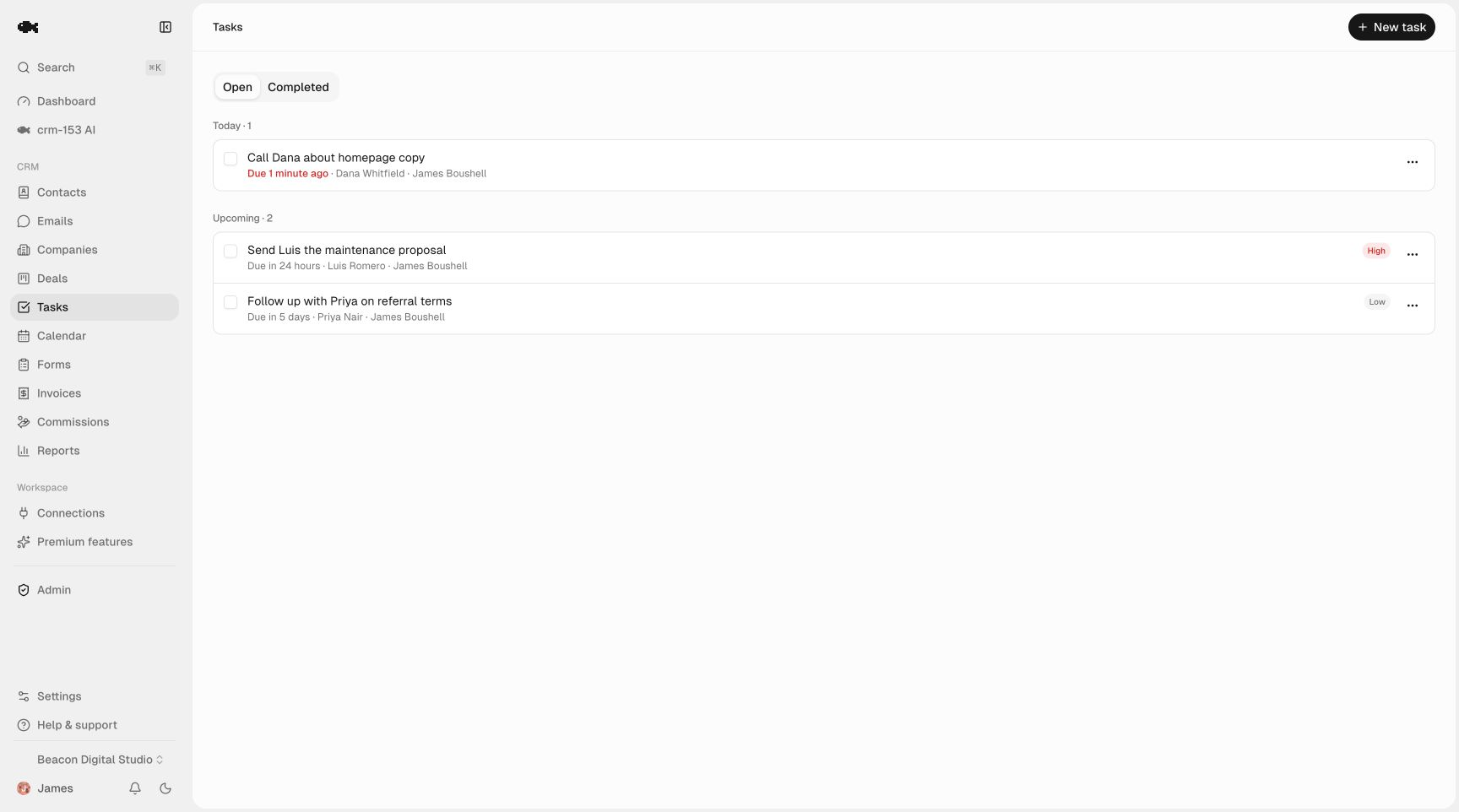
A practical rhythm:
- At the moment of sale, log the order on the timeline and set a task for roughly 80% of the way through the typical cycle.
- When the reminder fires, reach out — a short "you're probably getting low, want me to set up the next batch?" beats waiting for them to notice.
- After each reorder, reset the next task. The loop sustains itself without you holding every date in your head.
If you want to go deeper on cadence and recurring nudges, the guide on automating follow-up reminders applies directly to retention, not just new leads.
Use a pipeline for reorders and upsells
A pipeline isn't only for new prospects. For repeat business, build a second pipeline that tracks active reorder conversations and upsell opportunities. Stages might be as simple as Due for reorder → Reached out → Confirmed → Fulfilled, or you might run a separate one for Upsell / expansion when you're trying to move a customer to a bigger package.
With an unlimited sales pipeline, you can keep your new-business board and your repeat-business board side by side without juggling tabs. Each column shows its total value, so you can see at a glance how much repeat revenue is in motion this month versus how much is sitting idle in "Due for reorder" because nobody has called yet.
That last number is the one that quietly matters. A stalled "Due for reorder" column is money you've already earned the right to — you just haven't asked for it.
Track lifetime value, not just the last sale
The easiest trap in repeat business is judging customers by their most recent order. The customer who placed a small order last week might be your most valuable account over three years, while a big one-off might never return. You can't see that without the full history in one place.
You don't need fancy software to approximate lifetime value. With every order logged on the contact timeline, you can:
- Export the data whenever you want. Full CSV export is always available, so you can total orders per customer in a spreadsheet and sort by lifetime spend.
- Tag your best accounts (
top-20,vip) so they get faster responses and earlier reorder nudges. - Spot the fading ones — customers whose cadence is slipping — and re-engage before they're gone.
Reviewing this monthly turns gut feel into a short, honest list of who to protect and who to win back.
Keep the whole team on the same history
Repeat customers hate re-explaining themselves. If your team shares one record, the customer never has to. Because team seats are unlimited and data is org-shared, anyone — sales, support, the owner covering the phone on a Saturday — sees the same timeline and the same open tasks. The "mine" filters still let each person focus on their own accounts without losing the shared picture.
A free way to start today
Managing repeat customers well doesn't require an enterprise contract. It requires a shared record, reliable reminders, and a way to see history and value over time — which is exactly what crm-153 does, and it's genuinely free: no contact caps, no seat limits, no paid tier gating the export. Since it costs nothing to verify, you can see a live demo of a real workspace or start free and import your customer list with CSV import in an afternoon.
If you're weighing whether "free" has a catch, the honest breakdown is on how a CRM can be free. Either way, the mechanics above work in any decent CRM — the point is to stop running your best customers on memory.